

In the digital age, security is paramount. As technology advances, so do the methods employed by hackers and cybercriminals. It's no longer enough to simply have a strong password; additional measures are necessary to safeguard your data. One of these measures is two-factor authentication (2FA). This article provides an in-depth look at two-factor authentication, its role in Android security, and how you can implement it on your Android device.
Understanding Two-Factor Authentication
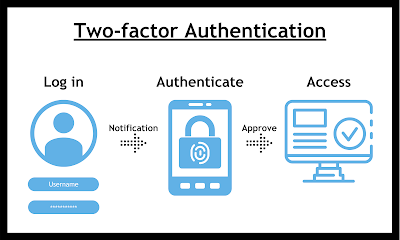
Two-factor authentication, often referred to as 2FA, is a security process in which the user provides two different authentication factors to verify themselves. The purpose of 2FA is to provide an extra level of security, making it harder for potential intruders to gain access to an individual's devices or online accounts. It combines something you know (like a password) with something you have (like a phone).
Importance of Two-Factor Authentication in Android Security
Android security has been a topic of concern for many users, given the open nature of the Android platform. While this openness allows for flexibility and customization, it also opens the door for potential security threats. This is where two-factor authentication comes into play.
With 2FA, even if someone manages to crack your password, they would still need your second authentication factor – often a unique code sent to your mobile device – to access your account. This significantly raises the bar for cybercriminals, making your Android device much more secure.
How to Enable Two-Factor Authentication on Android
To enable two-factor authentication on your Android device, you will need to go through the following steps:
- Go to your Google account settings.
- Select 'Security' on the left navigation panel.
- Under the 'Signing in to Google' panel, choose '2-Step Verification'.
- Click 'Get started' and follow the on-screen instructions.
Aiding Android Security with CleanSlate App
While two-factor authentication is an excellent method for enhancing Android security, there are other measures you can take to further protect your data. One such measure is using a reliable data privacy application, such as CleanSlate.
CleanSlate is designed to help you manage and protect your data, providing features such as data encryption, secure storage, and easy management of your privacy settings. With CleanSlate, you can take your Android security to the next level.
FAQs About Two-Factor Authentication and Android Security
1. Is two-factor authentication foolproof?
While two-factor authentication greatly enhances security, it is not completely foolproof. No security measure is 100% effective, and 2FA should be used in conjunction with other security measures such as strong, unique passwords and data encryption.
2. Does two-factor authentication work when I'm offline?
Yes, certain types of 2FA like Google Authenticator can generate verification codes even when your device is offline. However, SMS-based 2FA would require a cellular connection to receive the verification text.
3. How does the CleanSlate app improve Android security?
CleanSlate enhances Android security by providing features like data encryption, secure storage, and easy management of privacy settings. It's an extra layer of protection that complements other security measures like two-factor authentication.


